
RPC guide
Protocol
Our services use jsonrpc 2 to communicate between each other. This is the most simple and effective RPC protocol easily supported both by streaming and http.
Though the standard specification is fully supported, you can also use a compact version of the protocol with a few notable differences:
jsonrpc keyword can be omitted since the only supported protocol version is “2.0”.
id can be omitted, so it will be automatically generated by the server. You have to explicitly pass null value in id to create a Notification request. The reason behind omitting it is that it’s not that useful in terms of identifying requests when there are multiple apps and multiple instances of each apps as well as a big number of clients. It’s expected that clients will use the Correlation-Id header to identify request chains.
params argument must be an object (dictionary) or null, because all our public methods are keyword based and use jsonschema validators. It’s a deliberate decision to make API more transparent.
Request
So to remotely call a method you must pass a method name and parameters in a RPCRequest.
The call result will be present in the RPCResponse result field.
POST http://localhost/public/rpc {"id": 0, "method": "math_service.sum", "params": {"a": 2, "b": 2}}
-> {"id": 0, "result": 4}
Id is not required although may be useful when using websocket or in a batch request.
Since all requests have an internal timer and may be cancelled if taken too long, you may need to specify Timeout header.
Error
On error an RPCError object will be present in the results,
containing an integer code unique to this error type, a human readable message and data containing other information.
POST http://localhost/public/rpc {"id": 0, "method": "math_service.sum", "params": {"a": 2}}
-> {"id": null, "error": {"code": -32602, "message": "Invalid params",
    "data": {"required_args":["a", "b"], "optional_args": [],
    "provided_args": ["a"], "type": "InvalidParams"}}}
Notification
Notify requests require an explicit id=null. Notify requests do not return results. If there is a two way communication such as HTTP then the response will be returned as soon as the request has been validated, i.e. the server won’t wait until the request is executed.
POST http://localhost/public/rpc {"id": null, "method": "user_service.notify", "params": {"message": "Hello, RPC!"}}
# will return nothing unless it has failed pre-validation
Batch
Batches allow you to send multiple calls in a single body. The results are guaranteed to be in order and all requests in a batch are guaranteed to be run consequently.
POST http://localhost/public/rpc [
  {"id": 1, "method": "math_service.add", "params": {"a": 2, "b": 2},
  {"id": 2, "method": "math_service.add", "params": {"a": 3, "b": 3},
]
-> [{"id": 1, "result": 4}, {"id": 2, "result": 6}]
On error all subsequent requests in the batch will return as aborted unless RPC-Batch-Abort-Error header is false (which is the defaults). On timeout all subsequent requests in the batch will be returned with a timeout error.
If there is a pre-validation error in the batch (wrong number of request params, invalid json, invalid method, etc.) a single error will be produces and none of the batch requests will be scheduled for execution. The reason behind this is to prevent invalidly constructed requests from partial execution. This is the only exception when a batch request returns a single result object and not a number equals to the batch length.
Template
Can be enabled with RPC-Batch-Template header.
It allows you to execute a batch as if it was a template, where method params can use results from the previous requests.
Imagine you have “users.find” method where you can search users by their names and return a list of user objects. You need to block a specific user by username, but “users.block_users” only accepts a list of user ids as an argument. Instead of sending two separate requests and wasting time waiting for each response you can create a template batch, referencing “id” from the first method in the second one and aggregate user ids for the second request.
See also: Templates guide.
POST http://localhost/public/rpc [
  {"id": 0, "method": "users.find", "params": {"last_name": "Shiteman"}},
  {"id": 1, "method": "users.block_users", "params": {"id": "[0.user_id]"},
]
-> [[{"id": "fdsk34", "fist_name": "Dirk", "last_name": "Shiteman"}], [{"id": "fdsk34"}]]
Previous results can be referenced by their sequential number starting from 0.
Headers
For a list of supported headers see JSONRPCHeaders.
Session-Id
: string
You may provide a session id in a plain header, if a session backend has been configured on the server.
Correlation-Id
: string
It is an important header which allows to aggregate request related log records. Use a reasonably sized value for this (32 symbols or less). If not provided, a short random hex string will be used.
Timeout
: integer
Request maximum execution time in seconds. If no timeout has been specified, the server will use its default value.
Deadline
: integer
Same as Timeout but requires a UNIX time value. A request exceeded its deadline will be cancelled. If both timeout and deadline headers have been provided, the lesser deadline will be used.
RPC-Retries
: integer
A number of retries which a method call should take. retry() will retry the method
call on a connection or timeout error. Note however that retries does not shield the call from reaching its execution
deadline.
RPC-Batch-Abort-Error
: boolean (rfc8941) = false (default)
The whole batch should be aborted on a first exception. All consequent requests in the batch will be returned with Aborted error result.
RPC-Batch-Template
: boolean (rfc8941) = false (default)
A batch is a template where the results may be used by subsequent requests.
See Template.
Server
JSONRPCServer is used to process incoming RPC requests. It’s expected that the server is
to be used by transport classes (HTTP views, streams) to submit requests. However you can do it
manually from the code using call().
resp_headers, resp_body = await rpc_server.call(
  {'method': 'some_service.some_method', 'params': {'value': 42}},
  headers={'Timeout': 60},
  scope=Scope.SYSTEM)
You can provide a callback function for a call. The function must be async and must accept three arguments: a session, headers and response / error.
async def get_rpc_result(session, headers, response) -> None:
  """Call this once the request is completed."""
  ...

# will return None, the result will be sent to the callback instead
await rpc_server.call(
  {'method': 'some_service.some_method', 'params': {'value': 42}},
  headers={'Timeout': 60},
  scope=Scope.SYSTEM,
  callback=get_rpc_result)
Configuration
Here is an example of server configuration in your app config file.
services:
  - cls: JSONRPCServer
    name: rpc
    settings:
      default_request_time: 60
      max_request_time: 600
      enable_permissions: True
      request_logs: True
      response_logs: False
      blacklist_routes: ["my_service.*", "other_service.some_method"]
For better performance you may consider turning off request_logs or response_logs (request data will still be preserved in error logs).
You can use blacklist_routes to blacklist some of the methods. These methods won’t be available to anybody.
An RPC server will automatically register all methods from all PublicInterface
services once it’s started (excluding listed in blacklist_routes config param).
Permissions
To use permissions you must configure sessions and authentication.
See kaiju-auth documentation for more info on how to configure users
for the project. In general it would require a SessionInterface and
AuthenticationInterface services.
The server has two types of permission checks for methods. The first one uses Scope
to check visibility against a session scope.
The second one uses session permissions to check
if there is a permission for a method.
For example, you have a public method ‘messages.send` with a SYSTEM scope and
you have a session with a USER scope meaning the user won’t be able to access
this method. However if you add messages.send to the user’s permissions, the method will be available regardless
of the scope. If a user has messages permission then all methods of this service will be exposed to this particula
user.
See RPC services HOWTO on how to configure public methods and permissions.
Operation
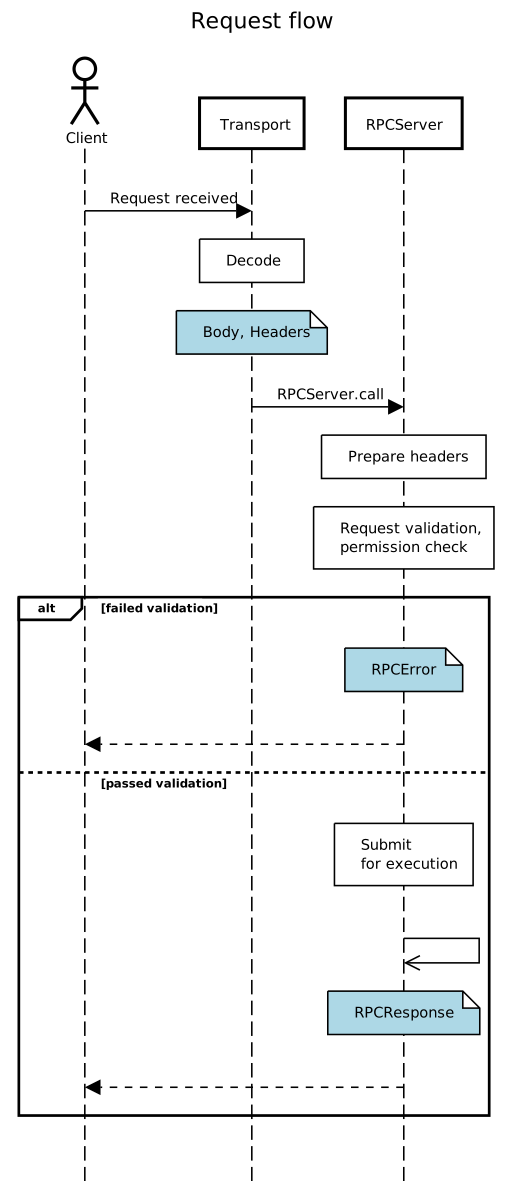
A typical request flow is shown on the diagram.
RPC services HOWTO
Once you have a new service you want to have an RPC interface for, you should use
PublicInterface in the service bases. Then you should provide a routes mapping
and optionally permissions and validators mappings for your services.
Validator may contain a custom validation function or a jsonschema object (see jsonschema - python object validation). A validator receives and returns a request params value.
from kaiju_tools import Service, PublicInterface, Scope, SERVICE_CLASS_REGISTRY
from kaiju_tools.jsonschema import Object, Number

class PaymentService(Service, PublicInterface):

  service_name = 'payments'  # service name is optional, it uses the class name by default

  @property
  def routes(self):
    # note that you can use different public names for your methods
    return {
      'create': self.create_new_payment
    }

  @property
  def permissions(self):
    # you can use wildcards in permissions
    return {
      # by default each public service has '*': Scope.SYSTEM meaning all methods are allowed only for the system user
      'create': Scope.GUEST
    }

  @property
  def validators(self):
    # validator is not required although it can be useful
    # it receives "params" value from a jsonrpc request
    return {
      'create': Object({'amount': Number(minimum=0)}, additionalProperties=False)
    }

  async def create_new_payment(self, amount: float) -> str:
    """Create a new payment and return its id."""
    ...

  SERVICE_CLASS_REGISTRY.register(PaymentService)  # register your service class
Once you have your service and you have registered it in SERVICE_CLASS_REGISTRY you can
configure it in the app yml file.
services:
  - cls: PaymentService
After you configured the interface, its methods will be registered in RPC server under their public names. For the example above you will be able to access PaymentService.create_new_payment using its public service and method names.
POST http://localhost/public/rpc {"method": "payments.create", "params": {"amount": 1000}}
-> {"id": 0, "result": "id123432"}
Alternatively you can use a custom validator function in validators. It must accept a params object and return
a validated params object and raise a InvalidParams if there is an error. This may
be useful when you need custom validation or normalization logic.
@property
def validators(self):
  return {
    'create': self.validate_payment_input
  }

@staticmethod
def validate_payment_input(data: dict) -> dict
  """Validate payment amount."""
  # Of course in this case it's easier to use jsonschema :-)
  if data['amount'] < 0:
    raise InvalidParams('Payment amount must be > 0')
  # note that you can modify incoming data in validators
  data['amount'] = round(data['amount'])
  return data
Session and user access
You can access Session and RequestContext by
calling specific methods in any of your service method. However the context is only available when there
is an RPC call and you have sessions and authentication configured for the RPC server.
There are a few methods to help you integrate the session context in your logic, including
get_request_context(),
get_session(),
has_permission(),
get_user_id() and
system_user().
async def list_customer_payments(self) -> list:
  """Get a list of active current customer payments."""
  session = self.get_session()
  customer_id = session.data.get('customer_id')  # supposing you store your customer in session data
  ...

async def list_all_payments(self) -> list:
  """List all active payments for all customers."""
  if self.has_permission('VIEW_ALL_PAYMENTS'):
    ...